
Table of Content
A Fremont plumbing owner spent $1,000 on Google Ads last month. He got 14 clicks. But zero calls.
He blamed the ads. He almost cancelled them. Then he looked at his website. It took eight seconds to load on his mobile. There was no phone number on the homepage. The contact form was broken.
The ads were never the problem. His website was.
This guide gives you a proven $1,000 split, a 30-day plan, and the numbers to expect.
Quick Answer: The $1,000 Blueprint
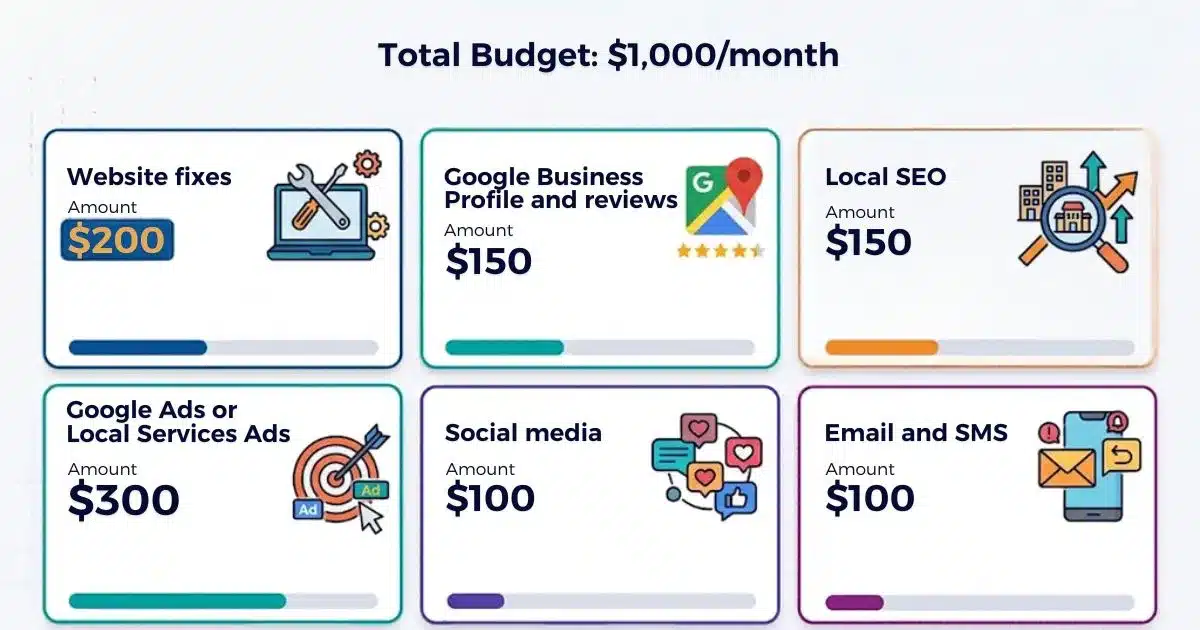
| Category | Amount | Purpose |
| Website fixes | $200 | Fix the leaks before buying traffic |
| Google Business Profile and reviews | $150 | Win the local map pack |
| Local SEO | $150 | Build compounding visibility |
| Google Ads or Local Services Ads | $300 | Capture high-intent buyers |
| Social media | $100 | Build trust and recognition |
| Email and SMS | $100 | Turn one-time customers into repeat buyers |
Why $1,000 Goes Further, or Disappears Faster, in the Bay Area
The Bay Area is not a normal market. Costs are higher. Competition is denser. Customers are more diverse. Your $1,000 has to work harder here.
Higher Rent, Wages, and Ad Costs
Commercial rent in San Francisco and San Jose ranks among the highest in the country. Labor costs have surged. Ad costs follow the same pattern. San Francisco CPCs run 30–50% above national averages.
The national average CPC is $5.42 . In Bay Area trades, clicks cost far more. Our serving of clients shows that roofing costs $15–35 per click. HVAC sits at $12–30. Plumbing comes in at $10–25..
That means $300 in ads buys roughly 10–25 clicks in those trades. Fewer leads. You need to know that before you spend.
A Diverse, Multilingual, Mobile-First Customer Base
The Bay Area speaks Mandarin, Hindi, Spanish, Vietnamese, and more. Customers search in their preferred language. If your website only speaks English, you may miss entire neighborhoods.
Most Bay Area customers search on their phones. A slow mobile site loses them before they call. Speed and language both matter here.
Competition City by City
A Fremont dentist competes with different practices than a San Francisco dentist. San Jose has more service-area businesses. Oakland has stronger community ties. The Peninsula has wealthier customers with higher expectations.
One marketing plan cannot fit all five markets. You need to know your city.
What $1,000 Can Realistically Achieve in 90 Days
Here is the honest answer. You will not dominate your market in 90 days. But you can:
- Fix your website so it converts visitors into calls
- Complete your Google Business Profile and start collecting reviews
- Launch a small, tightly targeted ad campaign
- Build a basic email list
- Know exactly which channels produce leads
That is a foundation. It compounds from there.
The Biggest Mistake: Buying Traffic Before You're Ready to Convert
Most small businesses make the same mistake. They spend on ads before fixing their website. They pay for clicks that land on a broken page.
The Ads-First Trap
An Oakland roofer spent $800 on Google Ads in his first month. He got 40 clicks and one call. The call came from his cousin.
His landing page had no phone number. No reviews. No clear offer. He was sending paid traffic into a leaky bucket.
The Leaky Bucket Idea
Imagine filling a bucket with water. If the bucket has holes, you waste water. Your marketing works the same way. If your website leaks visitors, no amount of traffic fixes it.
Fix the bucket first. Then pour water in.
Before and After
The Fremont plumber from our opening story fixed three things. He added click-to-call. He compressed his images. He added three customer reviews to the homepage.
His next $300 ad spend produced seven calls. The website was the difference.
Before You Spend: The 3-Hour Setup Checklist
You do not need a marketing degree. You need three hours and a clear plan. Complete these four steps before you spend a dollar.
1. Pick One Measurable Goal
Do not say "more customers." That is too vague. Pick one:
- Phone calls
- Booked appointments
- Form submissions
- In-store visits
One goal keeps your budget focused.
2. Define Your Best Customer and Service Area
Who do you want more of? A family dentist wants families. A divorce lawyer wants people in crisis. Write down your ideal customer.
Then define your service area. Which cities and ZIP codes do you serve? Exclude areas you cannot reach.
3. Set Up Tracking
You cannot improve what you do not measure. Set up:
- GA4 for website traffic
- Call tracking for phone leads
- UTM tags for campaign links
- Conversion events for form fills and bookings
This takes one hour. It reveals which channels work.
4. Know Your Numbers
Before you spend, answer three questions:
- What is your average sale value?
- What is your close rate on leads?
- What cost per lead can you afford?
If your average sale is $500 and you close 30% of leads, your break-even cost per lead is $150. Spend above that, and you lose money.
The $1,000 Blueprint at a Glance
Here is the full split. Each dollar has a job.
| Category | Amount | Purpose | What to Expect |
| Website fixes | $200 | Fix conversion leaks | More calls from the same traffic |
| GBP and reviews | $150 | Win the map pack | More calls from Google Maps |
| Local SEO | $150 | Build long-term visibility | Higher rankings in 3–6 months |
| Google Ads or LSA | $300 | Capture ready buyers | 10–25 clicks or 5–10 leads |
| Social media | $100 | Build trust | Brand recognition over time |
| Email and SMS | $100 | Drive repeat business | 20–30% re-engagement |
Why This Order
Foundation first. Fix the website before buying traffic. Visibility second. Win the map pack and local search. Demand third. Capture ready buyers with ads. Retention last. Keep customers coming back.
Three Variants
| Business Type | Biggest Allocation | Why |
| Service-area business | Google Ads ($350) | They need calls now |
| Storefront | GBP and reviews ($250) | They need foot traffic and trust |
| Appointment-based professional | Local SEO and ads ($300) | They need booked appointments |
Fix the Website That Converts Visitors ($200)
Your website is the destination for every ad click, every Google Maps call, every social post. If it fails, everything else fails.
Why a Slow or Confusing Site Wastes Every Other Dollar
A visitor waits three seconds. They leave. You paid for that click. You lost the customer.
Google also notices. Slow sites rank lower. You lose both paid and organic traffic.
The 7 Fixes That Matter
- Mobile speed.: Compress images. Use caching. Target under three seconds.
- Click-to-call : Make your phone number clickable. Put it at the top.
- A clear offer: What do you do? Who do you serve? Say it in one sentence.
- Trust proof : Add reviews, licenses, and before-and-after photos.
- Simple forms: Three fields maximum. Name, phone, problem.
- Service pages: One page per service. Not one page for everything.
- Thank-you page : Confirm the submission. Tell them what happens next.
What to Skip
Do not pay for a full redesign. Do not buy a custom theme. Do not hire a photographer for your homepage.
Fix the basics. A fast, clear, trustworthy site beats a beautiful slow one.
Win the Map Pack: Google Business Profile and Reviews ($150)
When someone searches "plumber near me," Google shows three businesses. That is the map pack. Most calls come from those three.
How Google Ranks Local Results
Google says local ranking rests on three factors: relevance, distance, and prominence.
Relevance means your profile matches the search. Distance means you are close. Prominence means Google trusts you. Reviews drive prominence.
The Profile Setup Checklist
- Choose the correct primary category
- Add secondary categories
- List every service
- Upload 20+ photos
- Set accurate hours
- Post weekly updates
- Answer questions
- Respond to every review
This takes two hours. It is free. As we observed, it produces calls within weeks.
A Simple Review System
Ask every happy customer. Hand them a QR code card with your review link. Send a follow-up text the same day.
Train your staff to ask at checkout. "If you had a good experience, would you mind leaving us a review?" That is all it takes.
How to Respond to Reviews
Thank positive reviewers. Be specific. "Thanks for mentioning our fast response, Maria."
Respond to negative reviews within 48 hours. Apologize. Offer to fix it. Take it offline. Future customers read your replies.
Local SEO That Compounds ($150)
Local SEO builds visibility over time. It targets city and service searches. It works slowly but compounds.
Service and City Pages
Create one page for each service in each city. "Plumber in Fremont." "Dentist in San Jose." These pages rank for local searches.
Each page needs unique content. Do not copy and paste. Mention local landmarks, neighborhoods, and customer stories.
Citations and NAP Consistency
Your name, address, and phone number must match everywhere. Google, Yelp, Facebook, and directories. Mismatches confuse Google. You lose trust.
Bay Area Community Links
Join your local chamber of commerce. Sponsor a youth sports team. Get mentioned in the local press. These links build authority.
Multilingual Content Opportunities
The Bay Area is multilingual. Add Spanish, Chinese, or Vietnamese versions of your key pages. Use a translation service, not Google Translate. This opens new customer segments.
Google Ads: Fast Leads on a Small Budget ($300)
Google Ads delivers leads fast. But it also burns budgets fast. Here is how to spend $300 wisely.
Search Ads or Local Services Ads
Google Search Ads charge per click. You control keywords, ads, and landing pages. Best for B2B, professional services, and businesses with complex offerings.
Local Services Ads (LSAs) charge per lead. You pay only when a customer contacts you. Best for home services, trades, and eligible local businesses.
What to Expect: CPC Ranges by Trade
| Metric | Cost | Context |
| Average home services click | ~$8 | Baseline across all trades |
| HVAC, plumbing, roofing, electrical clicks | 9–12 | Core trades in the article |
| Emergency plumbing or roof replacement clicks | $25+ | High-intent competitive terms |
| Roofing cost per lead | $225+ | Low conversion rate drives lead cost |
| Local Services Ads cost per lead | ~$63 | Pay per lead, not per click |
Source: Dukami’s client account data
At 10–35 per click, $300 buys 9–30 clicks across HVAC, plumbing, roofing, and electrical. If 10% convert to leads, that is 1–3 leads. That is honest math.
Campaign Setup
Use exact and phrase match. Add negative keywords. Target a tight radius around your business. Add call extensions.
Five Mistakes That Burn Small Budgets
- Bidding on broad keywords
- Ignoring search term reports
- Sending traffic to your homepage
- No call tracking
- Setting budgets too high too fast
Social Media That Builds Trust, Not Vanity ($100)
Social media is not for direct sales. It is for trust and recognition. Use it to stay visible.
Choose One or Two Platforms
Where are your customers? Facebook for older homeowners. Instagram for visual trades. LinkedIn for B2B. Pick one or two. Do them well.
A Weekly Rhythm of 3 Posts
Post three times a week:
- Proof: A before-and-after photo or a customer review
- Education: A quick tip related to your trade
- Behind the scenes: Your team at work
Consistency beats perfection.
Short Video on a Phone
Record a 30-second video on your phone. Show a quick repair. Explain a common problem. Post it. Videos get more reach than photos.
Boost your best post with 20–30. Target your city. Keep it simple.
Email and SMS: The Cheapest Way to Get Repeat Customers ($100)
Getting a new customer costs more than keeping one. Email and SMS keep you top of mind.
Build the List
Add a sign-up form to your website. Offer something in return. "Get 10% off your next service." Collect emails in-store. Add past customers.
A Starter Set of Three Emails
- Welcome: Thank them. Share a tip. Offer a small discount.
- Offer: Promote a seasonal service or maintenance package.
- Reminder: "It has been six months since your last service. Ready to book?"
Tool Options
Mailchimp starts free. Klaviyo charges based on list size. Textedly handles SMS. Pick one. Do not overcomplicate.
Where Not to Spend Your First $1,000
Some spending wastes money. Avoid these.
- Vanity metrics: Likes and followers do not pay bills.
- Broad, untargeted ads: Wastes money on people who will never buy.
- Full website redesigns: Fix the basics first.
- Tools you will not use: Start with free tools.
- "Guaranteed #1 ranking" vendors: No one can guarantee rankings.
- Paying for followers: Fake followers do not become customers.
Measure What Matters
Track six numbers. They tell you if your budget is working.
- Calls: From ads, GBP, and your website
- Form fills: From your website
- Cost per lead: Total spend divided by leads
- Cost per customer: Total spend divided by closed customers
- Review count: New reviews this month
- Map ranking: Where you appear in the local pack
A Free Reporting Stack
- GA4 for website traffic
- Looker Studio for dashboards
- GBP Insights for calls and direction requests
A Simple Monthly Scorecard
Review these six numbers on the first of every month. Compare them to last month. If cost per lead rises and leads fall, adjust. If reviews grow and calls grow, keep going.
Your First 30 Days, Step by Step
You do not need to do everything at once. Follow this weekly plan.
Week 1: Tracking and the Website
Set up GA4 and call tracking. Fix your mobile speed. Add click-to-call. Add reviews to your homepage.
Week 2: GBP and Reviews
Complete your Google Business Profile. Ask 10 happy customers for reviews. Respond to every existing review.
Week 3: Local SEO Pages and Ads Launch
Create one service page and one city page. Launch a small Google Ads campaign. Use exact match and negative keywords.
Week 4: Social, Email, and Review
Post three times on social media. Set up your email tool. Send your first welcome email. Review your numbers.
Days 31–90: Adjust
Double down on what works. Cut what does not. Increase ad spend slowly if leads are coming. Add more reviews every week.
DIY, Freelancer, or Agency?
| Option | Time Cost | Monthly Cost | Best For |
| DIY | 5–10 hours/week | $0 + tools | Owners with time and willingness to learn |
| Freelancer | 2–3 hours/week | 500–1,500 | Owners who want help but not a full agency |
| Agency | 1 hour/week | 1,500–5,000+ | Owners with budget and no time |
Hire help when your time is worth more than the cost. If you are spending 10 hours a week on marketing and still not seeing results, hire a freelancer or agency.
What If You Have Less, or More, Than $1,000?
The $500 Version
- Website fixes: $100
- GBP and reviews: $100
- Local SEO: $100
- Google Ads: $150
- Email: $50
Focus on foundation and local visibility. Skip social media. Do the work yourself.
The $2,500 Version
- Website fixes: $300
- GBP and reviews: $250
- Local SEO: $300
- Google Ads: $1,000
- Social media: $300
- Email and SMS: $200
- Content and video: $150
Add content marketing. Hire a freelancer for ads. Scale what works.
Conclusion and Next Step
You do not need a big budget to grow. You need a smart budget. Fix your website. Win the map pack. Capture high-intent searches. Keep customers coming back.
Start with the 30-day plan. Track six numbers. Adjust every month.
CTA: Download Your Free $1,000 Budget Planner
